"Borderline Property CSS: Mastering the Art of Styling"
In the realm of web design, CSS (Cascading Style Sheets) plays a pivotal role in shaping the visual aesthetics of a webpage. One of its most powerful features is the ability to create border effects, which can significantly enhance the overall look and feel of a website. Today, we're delving into the world of border properties in CSS, exploring their various aspects, and how you can leverage them to create stunning designs.
Understanding CSS Borders
Before we dive into the specifics, let's ensure we're on the same page regarding what CSS borders are. In essence, borders in CSS are lines that wrap around the content of an HTML element, providing a clear separation between different elements on a webpage. They can be solid, dashed, dotted, or even double-lined, offering a plethora of customization options.
Border Styles
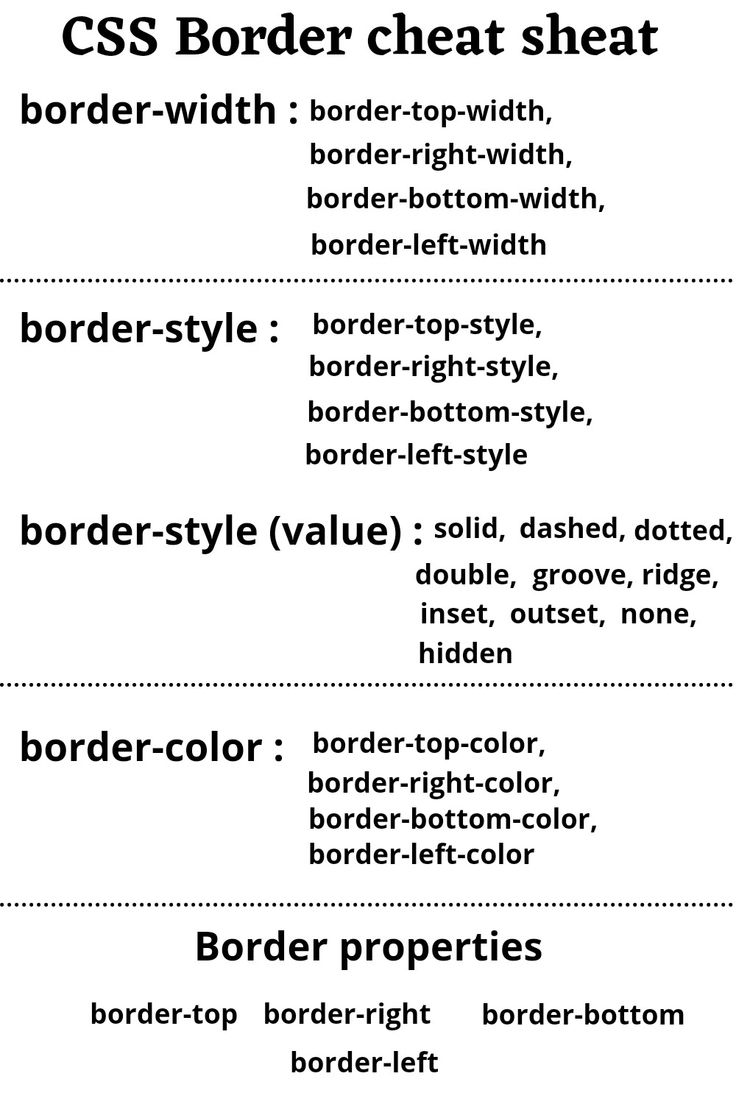
CSS provides several pre-defined border styles that you can apply to your elements. Here's a quick rundown:


- solid: A solid line.
- dashed: A dashed line.
- dotted: A dotted line.
- double: A double line.
- groove: A 3D groove.
- ridge: A 3D ridge.
- inset: An inset effect with a lighter inner border.
- outset: An outset effect with a darker outer border.
- none: No border.
- hidden: The border is not visible, but it still affects the layout.
Border Width
You can control the thickness of a border using the border-width property. It can take a single value for all sides, or different values for each side (top, right, bottom, left). Here's an example:
border-width: 5px 10px 15px 20px;Border Color
The border-color property allows you to set the color of the border. You can use any valid CSS color value, including hex codes, color names, or RGB/A values. Here's an example:


border-color: #ff0000; /* Red color */Border Radius
To create rounded corners, use the border-radius property. You can set the radius for all corners at once or specify different values for each corner. Here's an example:
border-radius: 10px;Border Shorthand
CSS provides a shorthand property called border that allows you to set all border properties at once. The syntax is as follows:
| Syntax | Description |
|---|---|
border: 1px solid red; |
Sets the border width, style, and color. |
border: 1px solid red 5px; |
Sets the border width, style, color, and radius. |
Using the border shorthand can make your CSS code more concise and easier to read.


Responsive Borders
In responsive web design, you can use media queries to apply different border styles based on the viewport size. Here's an example:
@media (max-width: 600px) {
  .my-element {
    border-style: dashed;
  }
}
In this example, the border style of the .my-element class will change to dashed when the viewport width is 600px or less.
Mastering CSS border properties can significantly enhance your web design skills, allowing you to create visually appealing and engaging websites. By understanding and experimenting with the various border styles, widths, colors, and radii, you can unlock a world of creative possibilities. So, go ahead, start playing with borders, and watch your designs come to life!


Related Articles

"Property Line Vacation: Your Guide to Borderline Bliss"
Have you ever dreamed of owning a piece of land where you can build your dream home, start a farm, or simply enjoy the great outdoors? A property line...

"What Does a Property Line Marker Look Like?"
Property line markers, also known as boundary markers or survey monuments, serve as visible indicators of the boundaries of a property. They are crucial for...

"Fence Setback: How Far From Property Line?"
When it comes to installing a fence on your property, one of the most common questions homeowners ask is, "How far away does a fence have to be from the...

"Property Line GPS Coordinates: Precise Mapping for Your Land"
In the digital age, precise property boundaries are more important than ever. Gone are the days of relying solely on physical markers or rough estimates...

"Mastering the Art of Styling: How to Dress Your Bed with White Bedding"
Creating a serene and inviting bedroom sanctuary often starts with the bedding. White bedding, in particular, offers a clean, crisp, and versatile canvas that...

"What is a Property Line Survey?"
A property line survey, also known as a boundary survey, is a critical land surveying service that determines the precise location of a property's boundaries...