"10 Genius Computer Desktop Organization Ideas for a Clutter-Free Workspace"
In the digital age, a well-organized computer desktop can significantly boost productivity and creativity. A clutter-free workspace, whether physical or virtual, allows for easier navigation, quicker access to important files, and a more pleasant user experience. Here, we'll explore various computer desktop organization ideas to help you transform your chaotic desktop into a streamlined, efficient hub.
Understanding the Importance of Desktop Organization
Before delving into organization ideas, it's crucial to understand why a tidy desktop matters. A clean desktop reduces stress, saves time, and enhances focus. It also makes your computer run more efficiently, as fewer resources are spent on processing unnecessary files and icons. Moreover, a well-organized desktop reflects a professional and organized demeanor, which can be particularly beneficial in remote work settings.
Desktop Organization Basics: The 4-3-2-1 Rule
Before diving into advanced organization techniques, let's establish a solid foundation with the 4-3-2-1 rule:


- 4: Keep no more than 4 folders on your desktop.
- 3: Limit yourself to 3 icons (applications or files) on your desktop.
- 2: Maintain only 2 background images (wallpapers) at a time.
- 1: Aim for 1 folder for each type of file (e.g., documents, photos, videos).
This rule serves as a simple yet effective starting point for desktop organization.
Categorize and Sort Your Files
Once you've applied the 4-3-2-1 rule, it's time to categorize and sort your files. Create distinct folders for different types of files, such as work documents, personal photos, music, and videos. Within these folders, create sub-folders for further organization. For instance, your 'Documents' folder could contain sub-folders like 'Work', 'Finance', 'Projects', etc.


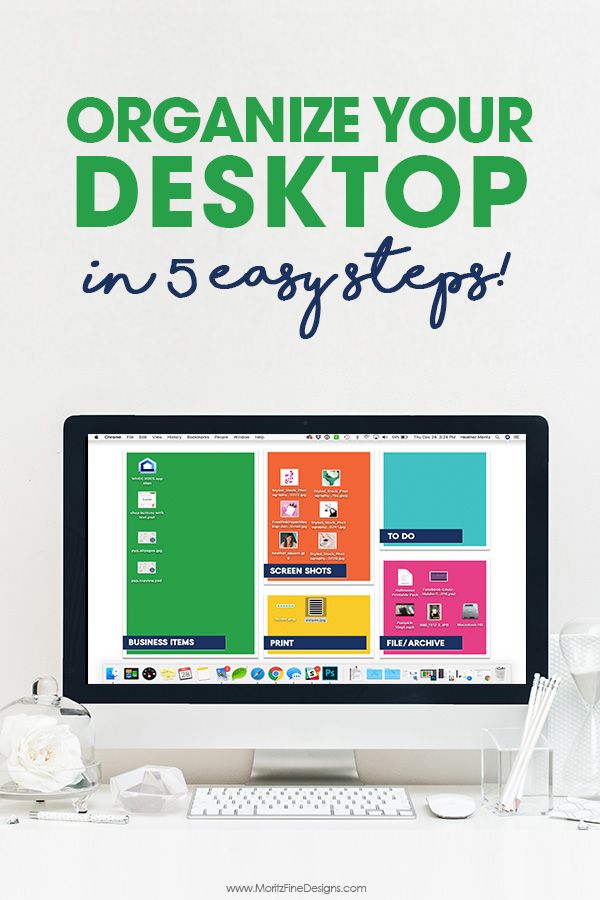
Use Naming Conventions for Easy Navigation
Adopt a consistent naming convention for your folders and files to make navigation easier. Use lowercase letters, avoid special characters, and keep names concise yet descriptive. For example, use 'project_report_2022' instead of 'PROJECT REPORT 2022.docx'. Also, consider using dates in the format 'YYYY-MM-DD' for time-sensitive files.
Leverage Desktop Widgets and Launchers
Desktop widgets and launchers can help declutter your desktop while providing quick access to essential tools and applications. Widgets like weather apps, calendars, and to-do lists can be placed directly on your desktop, while launchers allow you to pin frequently used applications for one-click access.
Implement the 'Inbox Zero' Concept
The 'Inbox Zero' concept, popularized by productivity expert Merlin Mann, can be applied to your desktop organization. The idea is to keep your desktop completely empty, with all files and folders stored in their respective folders. To access files, use the search function or create shortcuts on your taskbar or desktop launcher. This approach ensures a pristine desktop and encourages a more organized digital life.


Customize Your Desktop with Themes and Wallpapers
Once your desktop is organized, personalize it with themes and wallpapers to create a workspace that reflects your personality. Change your desktop background to an inspiring image, or use a dynamic wallpaper that displays different images each day. You can also customize your desktop theme, including colors, fonts, and icons, to create a visually appealing workspace.
Maintain Desktop Organization with Regular Upkeep
Desktop organization is an ongoing process that requires regular upkeep. Set aside a few minutes each week to tidy up your desktop, delete unnecessary files, and update your folders. Additionally, make it a habit to save new files directly to their respective folders instead of the desktop. By maintaining a clean desktop, you'll foster a productive and stress-free work environment.
| Desktop Organization Ideas at a Glance |
|---|
|


Related Articles

"10 Genius Storage Tote Organization Ideas for a Clutter-Free Home"
In the quest for a clutter-free, organized home, storage tote organization plays a pivotal role. These versatile, durable containers are perfect for keeping...
"10 Genius Home Office Desktop Organization Ideas"
Transforming your home office into a productive and clutter-free workspace is no small feat, especially when it comes to organizing your desktop. With the...

"Desk Organization Ideas: Inspiring Images for a Clutter-Free Workspace"
In today's fast-paced world, maintaining a clutter-free and organized workspace is more important than ever. A well-organized desk not only boosts productivity...

"10 Genius Office Organizer Ideas for a Clutter-Free Workspace"
Office Organizer Ideas: Boost Productivity and Minimize Clutter In today's fast-paced work environment, maintaining an organized office space is crucial for...

"Gaming Desk Organization: 10 Genius Ideas for a Clutter-Free Setup"
In the realm of gaming, having a well-organized workspace can significantly enhance your gaming experience. A clutter-free, ergonomic, and personalized gaming...

"10 Genius Bag Organization Ideas for a Clutter-Free Life"
Are you tired of rummaging through your bag every day, only to find that your essentials are buried under a mountain of clutter? It's time to take control of...